MetaNoteNotes, collections, and the links between them.
A workspace for rich-text notes and structured records, with collection views and a graph of their relationships.
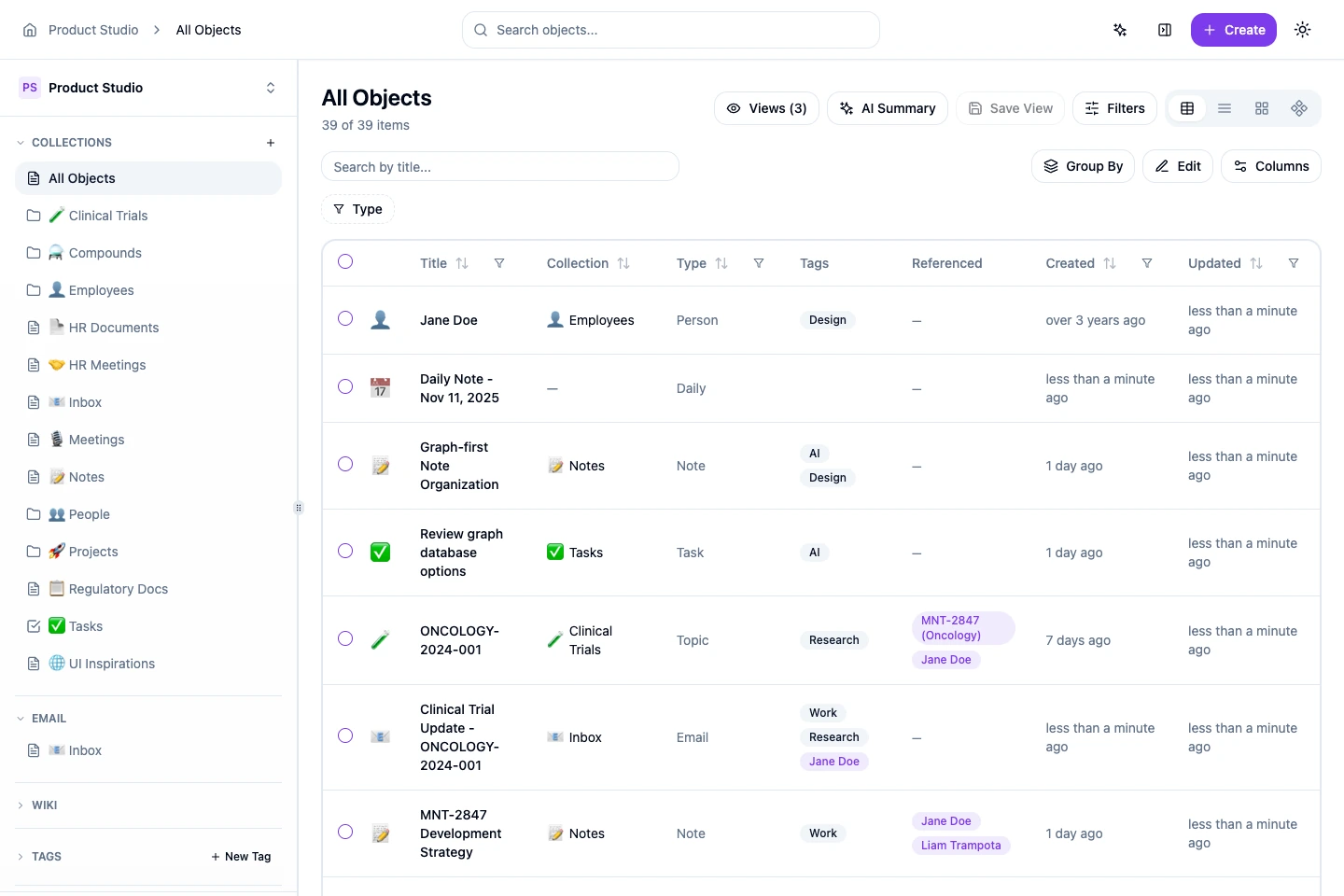
Screenshot of the MetaNote v2 React workspace running locally with sample records.
What MetaNote does.
MetaNote treats a note as an object that can hold text, properties, tags, and links to other objects.
The V2 workspace combines a rich-text editor with table, board, gallery, and graph views. You can organize a record in a collection, read it as a document, and follow its connections.
This case study focuses on the V2 workspace and graph. Older clients, a portal, and editor integrations also exist in the project, with different levels of implementation.
The problem
Documents are flexible, databases are structured, and folders only show one hierarchy. A knowledge workspace needs ways to write freely, organize information, and follow relationships between ideas.
Connect two notes
Search a small sample workspace, open a note, and add a relationship. All data stays in the page; the demo stores no personal notes.
Read the demonstration walkthrough
- Represent notes and records as objects with types, properties, and relationships.
- Offer table, board, gallery, document, and graph perspectives on connected information.
- Use entity references and reference tags to carry context across related objects.
- Keep explicit API contracts alongside a separate demo mode so prototype behavior can be explored without a connected backend.
How it works.
Represent notes and records as objects with types, properties, and relationships.
Offer table, board, gallery, document, and graph perspectives on connected information.
Use entity references and reference tags to carry context across related objects.
Keep explicit API contracts alongside a separate demo mode so prototype behavior can be explored without a connected backend.
Workspace interface
React and TypeScript provide a multi-pane workspace with collection views, object pages, navigation, and a TipTap editor.
Connected object model
Typed objects carry collection properties, tags, reference tags, and explicit relationships. Local helpers derive reference tags from collection references.
Graph exploration
Cytoscape projects objects and entity tags as nodes, relationships as edges, and object selection back into the workspace.
API and demo mode
OpenAPI-generated types and query clients support API integration. Explicit demo mode starts mock handlers; the local index is a bounded in-memory implementation, not a production semantic search service.
Why it’s built this way.
Keep the object the same across views
Switching from a document to a table or graph changes the presentation while preserving the object’s identity.
Make the graph navigable
Selecting a graph node opens its object page. The graph gives someone a path through their notes as well as a picture of the relationships.
Separate working features from plans
Collaboration, vector search, and expanded task features appear in planning documents. The workspace and object-model behavior described here are implemented in the V2 interface.
What to keep in mind.
- 01Properties and links should help someone find a note again.
- 02A graph is useful when its nodes open records and its edges describe real relationships.
- 03A separate demo mode makes the workspace easier to develop and explain.
The V2 workspace has both demo and API modes. This portfolio uses sample data.
Technical details come from the project’s source code and documentation. The demo uses sample data.