SuperducksBrowser testing you can check for yourself.
AI QA workers that test websites, recheck suspected bugs, and show the evidence behind each finding.
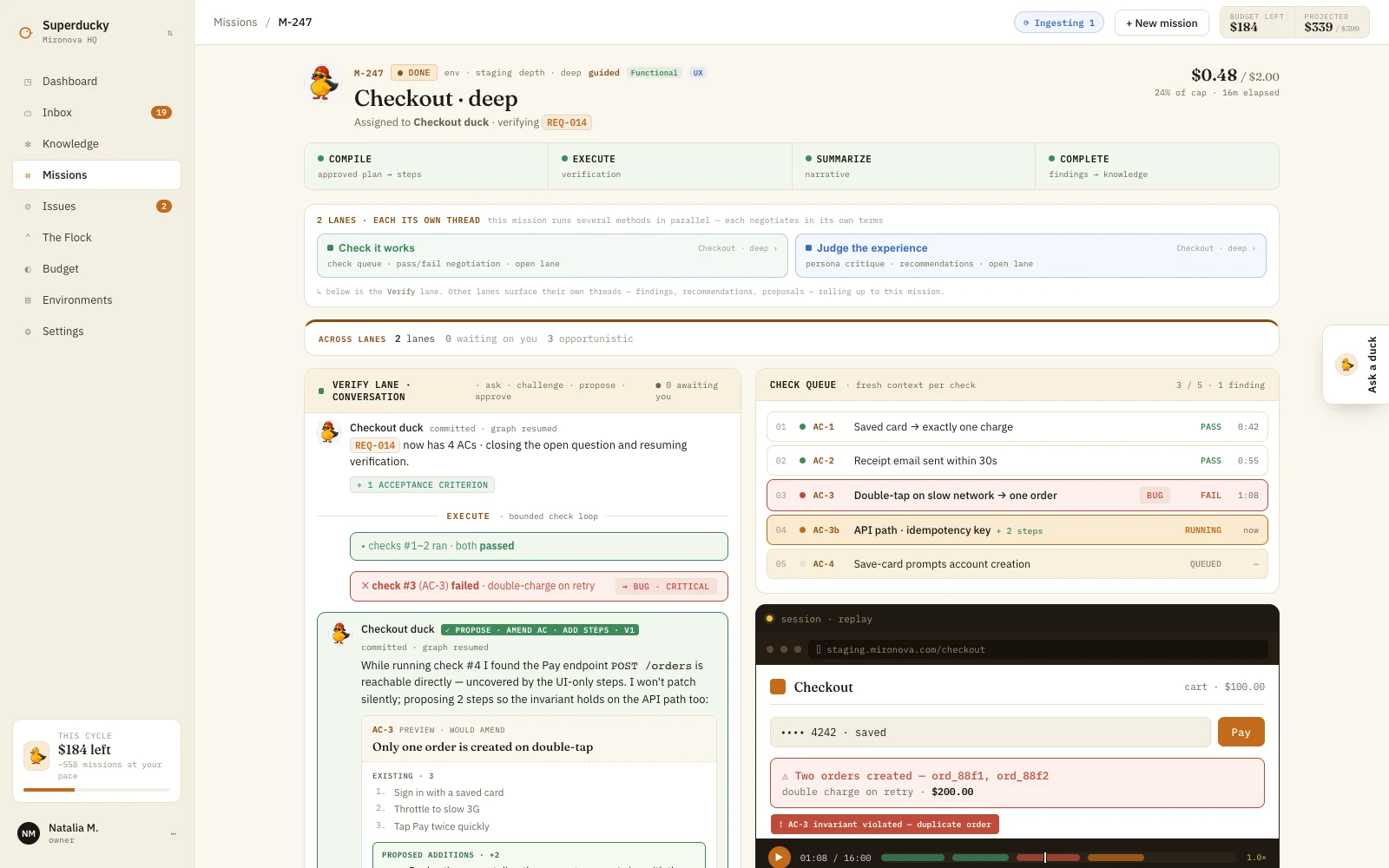
Screenshot of the original Superducks click-through prototype, using sample missions and records.
What Superducks does.
Superducks gives an AI agent a testing mission: check a website against its requirements and explain what passed, what failed, and what needs a closer look.
The workspace brings together requirements, browser runs, findings, and replay. A reviewer can see the expected behavior next to what the browser actually did.
A suspicious result gets a fresh verification run before it can become a bug report. That extra step helps separate product defects from mistakes in the test or problems with the environment.
The problem
An agent can mistake a broken test, a disconnected browser, or a vague requirement for a product bug. A useful QA report needs to identify which happened and show enough evidence for someone to check it.
Review a sample bug report
Step through a contact-form test and compare its expected and actual behavior. This sample uses prepared data; it does not run an agent against a live site.
Read the demonstration walkthrough
- Start with requirements and acceptance criteria, retaining the source of each expectation.
- Let the criterion agent investigate in the browser and write a candidate check.
- Run the check again, link its result to the exact code and execution artifacts, and save the outcome with its evidence.
- Show expected behavior, actual behavior, reproduction steps, and source citations before the generated code and full trace.
How it works.
Start with requirements and acceptance criteria, retaining the source of each expectation.
Let the criterion agent investigate in the browser and write a candidate check.
Run the check again, link its result to the exact code and execution artifacts, and save the outcome with its evidence.
Show expected behavior, actual behavior, reproduction steps, and source citations before the generated code and full trace.
Mission workspace
Next.js and a NestJS API provide missions, findings, project knowledge, and replay, with typed contracts and organization-scoped access.
Agent orchestration
BullMQ workers run LangGraph mission workflows and a LangChain criterion agent. PostgreSQL-backed state keeps progress across runs; host adapters handle execution infrastructure.
Browser runs
A worker-owned browser host handles investigation and fresh Playwright verification. Each result records the execution provider and a digest of the code that ran.
Evidence storage
Content-addressed bundles retain run artifacts. Typed citations point to specific text, JSON fields, steps, trace events, and images.
Why it’s built this way.
Recheck before reporting a bug
Investigation helps the agent write and repair a test. A final verification run supplies the evidence for a pass or bug. Unclear expectations remain inconclusive; infrastructure errors are recorded separately.
Let reviewers open the source
A short preview helps someone scan a report. Its citation opens the exact source, screenshot, trace event, or assertion behind the finding.
Record where the test ran
Local development runs record their provider and do not run inside a contained sandbox. The production OpenSandbox integration still needs remote testing, so a local pass cannot establish production isolation.
What to keep in mind.
- 01Every reported bug needs a clear expectation and a matching observation.
- 02An inconclusive result is useful when the requirement itself needs clarification.
- 03Evidence needs an availability state: a preview can outlive the artifact it came from.
In development. Evidence and replay are implemented; production sandbox testing is unfinished.
Technical details come from the project’s source code and documentation. The demo uses sample data.